To branch or not to branch—that is
an interesting question.
As if the rote actions involved in branching and
branch management aren't sometimes tricky enough, some users get
hung up on deciding whether they need to branch at all. The
decision of whether or not to branch a project's history is rarely
a technical one. Rather, the social impact of the decision often
carries more weight. Let's examine some of the benefits and costs
of using branches in a software project.
The most obvious benefit of working on a branch
is isolation. Changes made to the branch don't affect the other
lines of development in the project; changes made to those other
lines don't affect the branch. In this way, a branch can serve as a
great place to experiment with new features, complex bug fixes,
major code rewrites, and so on. No matter how much stuff Sally
breaks on her branch, Harry and the rest of the team can continue
with their work unhindered outside the branch.
Branches also provide a great way to organize
related changes into readily identifiable collections. For example,
the changes which comprise the complete solution to a particular
bug might be a list of non-sequential revision numbers. You might
describe them in human language as “revisions 1534, 1543,
1587 and 1588”. You'd probably reproduce those numbers
manually (or otherwise) in the issue tracker artifact which tracks
the bug. When porting the bug fix to other product versions, you'd
need to make sure to port all those revisions. But had those
changes been made on a unique branch, you'd find yourself referring
only to that branch by its name in conversation, in issue tracker
comments, and when porting changes.
The unfortunate downside of branches, though, is
that the very isolation that makes them so useful can be at odds
with the collaborative needs of the project team. Depending on the
work habits of your project peers, changes made to branches might
not get the kind of constructive review, criticism, and testing
that changes made to the main line of development do. The isolation
of a branch can encourage users to forsake certain version control
“best practices”, leading to version history which is
difficult to review post facto. Developers on long-lived branches
sometimes need to work extra hard to ensure that the evolutionary
direction of their isolated copy of the codebase is in harmony with
the direction their peers are steering the main code lines. Now,
these drawbacks might be less of an issue for true exploratory
branches aimed at experimenting with the future of a codebase with
no expectation of reintegrating the results back into the main
development lines—mere policy needn't be a vision-killer! But
the simple fact remains that projects generally benefit from an
orderly approach to version control where code and code changes
enjoy the review and comprehension of more than one team
member.
That's not to say that there are no technical
penalties to branching. Pardon us while we “go meta”
for a bit here. If you think about it, every time you checkout a
working copy, you're creating a branch of sorts of your project.
It's a special sort of branch. It lives only on your client
machine; not in the repository. You synchronize this branch with
changes made in the repository You effectively reintegrate your
branch each time you commit. So, in that special sense, users deal
with branches and merges all the time. Given the similarities
between updating and merging, it's no surprise, then,
To branch or not to branch? Ultimately, that
depends on what your team needs in order to find that sweet balance
of collaboration and isolation.
Multi Version
Trunk Model
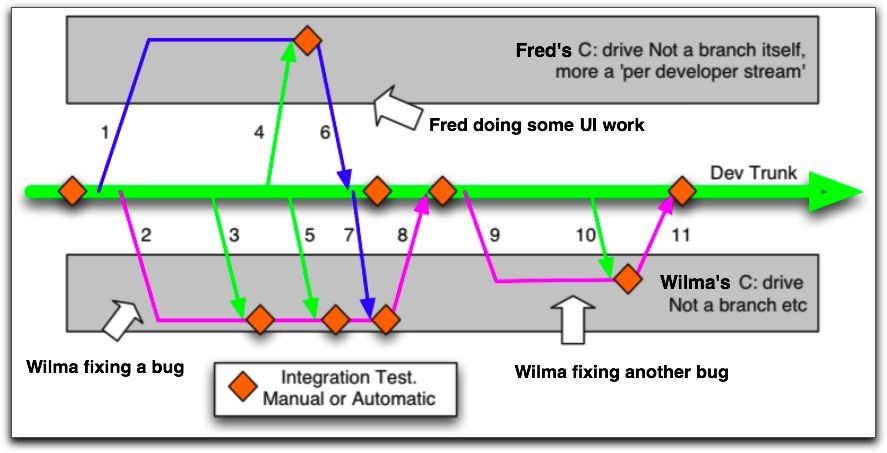
A
day in the life of two trunk developers..