To be honest, I think that quite often people
aren’t even aware they’re committing their own personal
settings into source control. Here’s what the problem is:
many tools will produce artefacts which manage your own personal,
local configurations. They’re only intended to be for you and
they’ll usually be different to everyone else's. If you put
them into VCS, suddenly you’re all overwriting each
other’s personal settings. This is not good.
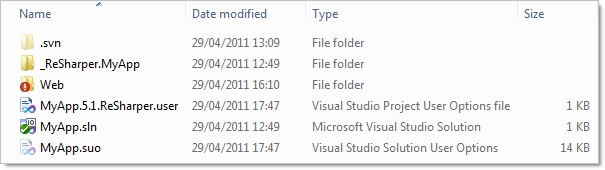
Here’s an example of a typical .NET
app:
The giveaway should be the extensions and type
descriptions but in case it’s not immediately clear, the
.ReSharper.user file and the .suo (Solution User Options) file are
both, well, yours. They’re nobody else's.
Here’s why: Let’s take a look inside
the ReSharper file:
<Configuration>
<SettingsComponent>
<string />
<integer />
<boolean>
<setting
name="SolutionAnalysisEnabled">True</setting>
</boolean>
</SettingsComponent>
<RecentFiles>
<RecentFiles>
<File
id="F985644D-6F99-43AB-93F5-C1569A66B0A7/f:Web.config"
caret="1121" fromTop="26" />
<File
id="F985644D-6F99-43AB-93F5-C1569A66B0A7/f:Site.Master.cs"
caret="0" fromTop="0" />
In this example, the fact that I enabled solution
analysis is recorded in the user file. That’s fine by me, I
like it, other people don’t. Normally because they’ve
got an aging, bargain basement PC, but I digress. The point is that
this is my setting and I shouldn’t be forcing it upon
everyone else. It’s just the same with the recent files node;
just because I recently opened these files doesn’t mean it
should go into someone else’s ReSharper history.
It’s a similar story with the .suo file.
Whilst there’s not much point looking inside it (no pretty
XML here, it’s all binary), the file records things like the
state of the solution explorer, publishing settings and other
things that you don’t want to go forcing on other
people.